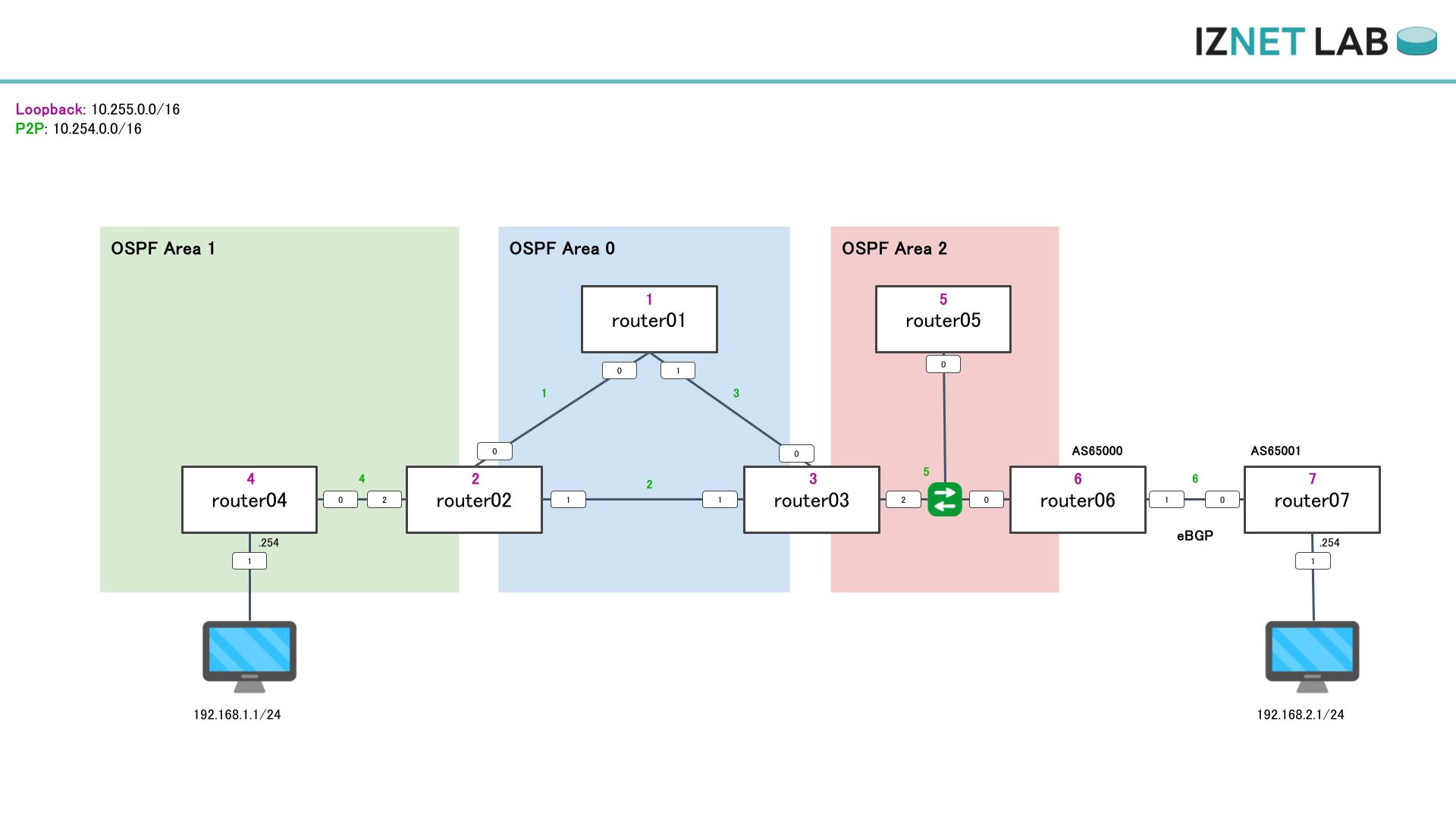
動作確認
基本構文
router01
router ospf OSPF-1
 router-id 10.255.0.1
 area 0
  interface Loopback0
   passive enable
  !
  interface GigabitEthernet0/0/0/0
   cost 100
   network point-to-point
  !
  interface GigabitEthernet0/0/0/1
   cost 100
   network point-to-point
  !
 !
!router02
router ospf OSPF-1
router-id 10.255.0.2
area 0
interface Loopback0
passive enable
!
interface GigabitEthernet0/0/0/0
cost 100
network point-to-point
!
interface GigabitEthernet0/0/0/1
cost 100
network point-to-point
!
!
area 1
interface GigabitEthernet0/0/0/2
cost 100
network point-to-point
!
!
!router06
route-policy ALL_ROUTE
pass
end-policy
!
router ospf OSPF-1
router-id 10.255.0.6
redistribute bgp 65000 metric-type 1 route-policy ALL_ROUTE
area 2
interface Loopback0
passive enable
!
interface GigabitEthernet0/0/0/0
cost 100
!
!
!状態確認
show ospf
RP/0/RP0/CPU0:router01#show ospf
Wed Dec 24 18:43:35.541 UTC
Routing Process "ospf OSPF-1" with ID 10.255.0.1
Role: Primary Active
NSR (Non-stop routing) is Enabled
Supports only single TOS(TOS0) routes
Supports opaque LSA
Maximum number of non self-generated LSA allowed 500000
Current number of non self-generated LSA 10
Threshold for warning message 75%
Ignore-time 5 minutes, reset-time 10 minutes
Ignore-count allowed 5, current ignore-count 0
Maximum number of external prefixes per router 50000 (suppress-neighbor)
Warning threshold 75%
Maximum Exchange time 10 Hold time 5 Max Recovery count 300
Router is not originating router-LSAs with maximum metric
Initial SPF schedule delay 50 msecs
Minimum hold time between two consecutive SPFs 200 msecs
Maximum wait time between two consecutive SPFs 5000 msecs
Initial LSA throttle delay 50 msecs
Minimum hold time for LSA throttle 200 msecs
Maximum wait time for LSA throttle 5000 msecs
Minimum LSA interval 200 msecs. Minimum LSA arrival 100 msecs
LSA refresh interval 1800 seconds
Flood pacing interval 33 msecs. Retransmission pacing interval 66 msecs
Adjacency stagger enabled; initial (per area): 2, maximum: 64
Number of neighbors forming: 0, 2 full
Maximum number of configured interfaces 1024
Number of external LSA 1. Checksum Sum 0x0027a3
Number of opaque AS LSA 0. Checksum Sum 00000000
Number of DCbitless external and opaque AS LSA 0
Number of DoNotAge external and opaque AS LSA 0
Number of areas in this router is 1. 1 normal 0 stub 0 nssa
External flood list length 0
SNMP trap is enabled
LSD not connected, revision 0
Segment Routing Global Block default (16000-23999), not allocated
Segment Routing Local Block, unknown
Segment Routing prefix-sid-map, Advertise local: Disabled, Receive remote: Disabled
Strict-SPF capability is enabled
Area BACKBONE(0)
Number of interfaces in this area is 3
SPF algorithm executed 14 times
Number of LSA 10. Checksum Sum 0x04cc8a
Number of opaque link LSA 0. Checksum Sum 00000000
Number of DCbitless LSA 0
Number of indication LSA 0
Number of DoNotAge LSA 0
Flood list length 0
Number of LFA enabled interfaces 0, LFA revision 0
Number of Per Prefix LFA enabled interfaces 0
Number of neighbors forming in staggered mode 0, 2 fullshow ospf neighbor
RP/0/RP0/CPU0:router01#show ospf neighbor
Wed Dec 24 18:42:46.562 UTC
* Indicates MADJ interface
# Indicates Neighbor awaiting BFD session up
Neighbors for OSPF OSPF-1
Neighbor ID Pri State Dead Time Address Interface
10.255.0.2 1 FULL/ - 00:00:33 10.254.1.2 GigabitEthernet0/0/0/0
Neighbor is up for 05:08:27
10.255.0.3 1 FULL/ - 00:00:33 10.254.3.2 GigabitEthernet0/0/0/1
Neighbor is up for 05:08:23
Total neighbor count: 2show ospf interface brief
RP/0/RP0/CPU0:router01#show ospf interface brief
Wed Dec 24 18:44:09.327 UTC
* Indicates MADJ interface, (P) Indicates fast detect hold down state
Interfaces for OSPF OSPF-1
Interface PID Area IP Address/Mask Cost State Nbrs F/C
Lo0 OSPF-1 0 10.255.0.1/32 1 LOOP 0/0
Gi0/0/0/0 OSPF-1 0 10.254.1.1/24 100 P2P 1/1
Gi0/0/0/1 OSPF-1 0 10.254.3.1/24 100 P2P 1/1show ospf database
RP/0/RP0/CPU0:router01#show ospf database
Wed Dec 24 18:46:23.888 UTC
OSPF Router with ID (10.255.0.1) (Process ID OSPF-1)
Router Link States (Area 0)
Link ID ADV Router Age Seq# Checksum Link count
10.255.0.1 10.255.0.1 495 0x8000000f 0x00effd 5
10.255.0.2 10.255.0.2 445 0x8000000d 0x008a63 5
10.255.0.3 10.255.0.3 463 0x8000000f 0x00f8eb 5
Summary Net Link States (Area 0)
Link ID ADV Router Age Seq# Checksum
10.254.4.0 10.255.0.2 1449 0x8000000a 0x005a5c
10.254.5.0 10.255.0.3 1478 0x8000000a 0x00496b
10.255.0.4 10.255.0.2 445 0x80000007 0x006255
10.255.0.5 10.255.0.3 463 0x80000007 0x005263
10.255.0.6 10.255.0.3 463 0x80000007 0x00486c
192.168.1.0 10.255.0.2 1449 0x8000000a 0x004a0e
Summary ASB Link States (Area 0)
Link ID ADV Router Age Seq# Checksum
10.255.0.6 10.255.0.3 463 0x80000007 0x003084
Type-5 AS External Link States
Link ID ADV Router Age Seq# Checksum Tag
192.168.2.0 10.255.0.6 257 0x80000007 0x00a327 65001機能別検証
ProcessとRouter-ID
設定
router ospf OSPF-1
 router-id 10.255.0.1
 area 0
  interface Loopback0
   passive enable
  !
  interface GigabitEthernet0/0/0/0
   cost 100
   network point-to-point
  !
  interface GigabitEthernet0/0/0/1
   cost 100
   network point-to-point
  !
 !
!確認コマンド
RP/0/RP0/CPU0:router01(config)#do show ospf
Wed Dec 24 19:00:39.514 UTC
Routing Process "ospf OSPF-1" with ID 10.255.0.1
Role: Primary Active
NSR (Non-stop routing) is Enabled
Supports only single TOS(TOS0) routes
Supports opaque LSA
Maximum number of non self-generated LSA allowed 500000
Current number of non self-generated LSA 10
Threshold for warning message 75%
Ignore-time 5 minutes, reset-time 10 minutes
Ignore-count allowed 5, current ignore-count 0
Maximum number of external prefixes per router 50000 (suppress-neighbor)
Warning threshold 75%
Maximum Exchange time 10 Hold time 5 Max Recovery count 300
Router is not originating router-LSAs with maximum metric
Initial SPF schedule delay 50 msecs
Minimum hold time between two consecutive SPFs 200 msecs
Maximum wait time between two consecutive SPFs 5000 msecs
Initial LSA throttle delay 50 msecs
Minimum hold time for LSA throttle 200 msecs
Maximum wait time for LSA throttle 5000 msecs
Minimum LSA interval 200 msecs. Minimum LSA arrival 100 msecs
LSA refresh interval 1800 seconds
Flood pacing interval 33 msecs. Retransmission pacing interval 66 msecs
Adjacency stagger enabled; initial (per area): 2, maximum: 64
Number of neighbors forming: 0, 2 full
Maximum number of configured interfaces 1024
Number of external LSA 1. Checksum Sum 0x0027a3
Number of opaque AS LSA 0. Checksum Sum 00000000
Number of DCbitless external and opaque AS LSA 0
Number of DoNotAge external and opaque AS LSA 0
Number of areas in this router is 1. 1 normal 0 stub 0 nssa
External flood list length 0
SNMP trap is enabled
LSD not connected, revision 0
Segment Routing Global Block default (16000-23999), not allocated
Segment Routing Local Block, unknown
Segment Routing prefix-sid-map, Advertise local: Disabled, Receive remote: Disabled
Strict-SPF capability is enabled
Area BACKBONE(0)
Number of interfaces in this area is 3
SPF algorithm executed 18 times
Number of LSA 10. Checksum Sum 0x04c695
Number of opaque link LSA 0. Checksum Sum 00000000
Number of DCbitless LSA 0
Number of indication LSA 0
Number of DoNotAge LSA 0
Flood list length 0
Number of LFA enabled interfaces 0, LFA revision 0
Number of Per Prefix LFA enabled interfaces 0
Number of neighbors forming in staggered mode 0, 2 fullIOS-XRでは複数のOSPFプロセスを動かすことが可能で複数のOSPFドメインに所属することができる。ただし、データベースはそれぞれで独立する。
router-idはドメインの中でユニークである必要がある。自動的に採番もされるが明示的にrouter-idで設定することが推奨されている。
AreaとNeighborの確立
設定
router ospf OSPF-1
 router-id 10.255.0.1
 area 0
  interface Loopback0
   passive enable
  !
  interface GigabitEthernet0/0/0/0
   cost 100
   network point-to-point
  !
  interface GigabitEthernet0/0/0/1
   cost 100
   network point-to-point
  !
 !
!確認コマンド
RP/0/RP0/CPU0:router01(config)#do show ospf interface brief
Wed Dec 24 19:04:57.045 UTC

* Indicates MADJ interface, (P) Indicates fast detect hold down state

Interfaces for OSPF OSPF-1

Interface          PID   Area            IP Address/Mask    Cost  State Nbrs F/C
Lo0                OSPF-1 0               10.255.0.1/32      1     LOOP  0/0
Gi0/0/0/0          OSPF-1 0               10.254.1.1/24      100   P2P   1/1
Gi0/0/0/1          OSPF-1 0               10.254.3.1/24      100   P2P   1/1

RP/0/RP0/CPU0:router01(config)#do show ospf neighbor
Wed Dec 24 19:05:01.663 UTC

* Indicates MADJ interface
# Indicates Neighbor awaiting BFD session up

Neighbors for OSPF OSPF-1

Neighbor ID     Pri   State           Dead Time   Address         Interface
10.255.0.2      1     FULL/  -        00:00:35    10.254.1.2      GigabitEthernet0/0/0/0
    Neighbor is up for 00:13:21
10.255.0.3      1     FULL/  -        00:00:34    10.254.3.2      GigabitEthernet0/0/0/1
    Neighbor is up for 00:13:16

Total neighbor count: 2全員が共通して詳細なデータベースをもつドメインを決定するエリアの設定。
Neighborを確立するには同じドメインである必要がある。
IOS-XRはInterfaceではなくOSPFプロセスの中に有効にするインターフェースを記載する。
パラメータ
プロセス直下のパラメータ
| 分類 | コマンド | 内容 (AI) |
|---|---|---|
| 基本設定 | address-family | IPv4/IPv6アドレスファミリを有効化し、トポロジ設定へ遷移 |
| area | OSPFエリアIDを定義し、エリア設定モードへ遷移 | |
| router-id | OSPFルータID(一意の識別子)を手動設定 | |
| vrf | 特定のVRFインスタンス毎の設定を行う | |
| protocol shutdown | OSPFプロセス自体をシャットダウン | |
| ネイバー・隣接関係 | adjacency stagger | エリアごとにNeighbor確立数を制限してCPU負荷を抑制 |
| bfd | BFDによる高速障害検知を有効化 | |
| capability | LLS, Opaque LSA, type7などの機能を設定 | |
| demand-circuit | LSUやHelloを抑制してダイアルアップ回線においてトラフィックを抑制する | |
| mtu-ignore | ネイバー確立時のDBDパケットにおけるMTU不一致チェックを無視 | |
| network | ネットワークタイプ(Broadcast, P2P, NBMA等)のデフォルト設定 | |
| passive | インターフェースをパッシブ(Hello送信停止)に設定 | |
| メトリック・パス制御 | apply-weight | UCMPをする際に利用するweight/bandwidthの設定 |
| auto-cost | 帯域幅に基づくコスト自動計算時の「基準帯域幅」を設定 | |
| cost | インターフェースのOSPFコスト値を設定 | |
| cost-fallback | リンク遅延や損失通知時にメトリックを変更する設定 | |
| default-metric | 再配布ルートのデフォルトメトリック値を設定 | |
| distance | OSPFルートのAD値を変更 | |
| max-metric | トラフィックを迂回用に全リンクのメトリックを最大にする | |
| ucmp | UCMP(不等コストマルチパス)の設定 | |
| weight | パス選択に使用する重み付け値を設定 | |
| ルート制御・再配布 | default-information | デフォルトルート(0.0.0.0/0)の生成・配布 |
| distribute | OSPFが持つLink StateをBGP-LSやLS配布をするモジュールに渡す | |
| distribute-list | LSDBの経路をRIBに入れるときにフィルタする | |
| external-out | エリア内ルートを外部ルートとして広告する設定(特殊用途) | |
| loopback stub-network | ループバックIFは通常/32のホストルートだが、stubを無効にしてサブネットの状態で広報できるようにする | |
| prefix-suppression | LinkStateは伝えるが、Prefixを伝えない設定。Passiveの逆イメージ(Neighbor張るけど経路なし) | |
| redistribute | 他プロトコル(BGP, Static等)ルートのOSPFへの再配布 | |
| summary-in | 外部プレフィックスをエリア間ルートに変更して集約広告 | |
| summary-prefix | ルート集約の設定 | |
| タイマー・調整 | dead-interval | ネイバーダウン判定までの待機時間(秒) |
| delay | normalize 等による遅延の正規化間隔設定 | |
| exchange-timer | データベース交換(DBD)のタイムアウト時間 | |
| hello-interval | Helloパケットの送信間隔(秒) | |
| packet-size | OSPFパケットの最大サイズ。mtu以下にする。 | |
| retransmit-interval | LSA再送までの待機時間(秒) | |
| spf | SPF計算の優先度制御など | |
| timers | SPF計算やLSA生成の遅延(スロットリング)タイマー | |
| transmit-delay | LSA送信時に経過時間として加算する遅延時間(秒) | |
| 高可用性・保護 | fast-reroute | IP FRR(LFA: Loop-Free Alternateなど)による高速迂回の有効化 |
| link-down | fast-detect によるリンクダウン早期検出の有効化 | |
| microloop avoidance | コンバージェンス中のマイクロループ(一時的ループ)回避機能の設定 | |
| nsf | NSF(Non Stop Forwarding)設定によるプロセス再起動時の通信維持 | |
| nsr | NSR(Non Stop Routing)設定によるスタンバイRP同期と通信維持 | |
| MPLS / Segment Routing | affinity-map | リンクアフィニティ(属性)の名前と値のマッピング |
| flex-algo | Segment RoutingのFlexible Algorithm(特定メトリック等に基づく経路計算)定義 | |
| mpls | MPLS LDPやTraffic Engineering (TE) 関連パラメータの設定 | |
| segment-routing | Segment Routing(SR)の有効化、GB(Global Block)等の設定 | |
| srlg | SRLG(共有リスクリンクグループ)の設定 | |
| セキュリティ・制限 | authentication | 認証機能(MD5, Keychain等)の設定 |
| authentication-key | 認証用パスワード(キー)の設定 | |
| database-filter | 特定LSAの送受信フィルタリング | |
| ignore | 特定LSAタイプ受信時のエラーログ出力を抑制 | |
| max-external-lsa | 受信可能な外部LSA(Type-5)の最大数制限 | |
| max-lsa | 他ルータ生成LSAの保持最大数制限 | |
| maximum | インターフェース数、パス数、再配布プレフィックス数などの上限設定 | |
| message-digest-key | MD5認証用キーIDとパスワードの設定 | |
| security ttl | GTSM設定による遠隔攻撃の防止 | |
| ログ・監視・管理 | flood-reduction | 定期的なLSAリフレッシュを抑制しフラッディングを低減(DoNotAge使用) |
| log | ネイバー状態変化などのSyslog出力設定 | |
| monitor-convergence | コンバージェンス時間のモニタリング機能有効化 | |
| priority | DR/BDR選出用プライオリティの設定 | |
| queue | 内部イベント処理キューの調整 | |
| snmp | OSPF関連SNMPトラップやコンテキストの設定 | |
| trace | トラブルシューティング用トレースバッファサイズの設定 |
エリア直下のパラメータ
| 分類 | コマンド | 内容 (AI) |
|---|---|---|
| エリアタイプ定義 | stub | スタブエリアとして設定(no-summary指定でTotally Stub化が可能) |
| nssa | NSSAとして設定(no-summary, default-information-originate, translate等を指定可能) | |
| default-cost | スタブ/NSSAへ注入されるデフォルトルートのコスト値を設定 | |
| インターフェース割当 | interface | 各種インターフェース(Ethernet, Bundle, Loopback, Tunnel等)をエリアへ割り当て |
| multi-area-interface | 単一インターフェースで複数のエリア隣接を確立 | |
| virtual-link | 対向ルータIDを指定して仮想リンクを確立 | |
| 集約・フィルタリング | range | 指定したアドレス範囲を集約(サマリー)して広告 |
| route-policy | ルートポリシー名を指定してフィルタリング等を適用 |
インターフェース直下のパラメータ
| 分類 | コマンド | 内容 (AI) |
|---|---|---|
| Segment Routing / Flex-Algo | adjacency-sid | Segment RoutingのAdjacency SID(絶対値またはインデックス)を手動設定 |
| affinity | Flex-Algo経路計算に使用するリンクアフィニティ(属性名)を設定 | |
| te-metric | Flex-Algo経路計算に使用するTEメトリック値を設定 | |
| ネイバー関係 | neighbor | NBMA(Non-Broadcast Multi-Access)ネットワーク等におけるネイバーIPアドレスの静的設定 |
経路の生成
OSPFにおいて、経路を伝搬させる(=すなわち経路生成)は下記の方法で可能となる。
- OSPFを有効にする : そのインターフェースでOSPFを有効にしてLSAに含める。Neighborを張らなくてもPassiveでも良い。
- 再配送する : OSPF以外の経路をソースとしてOSPFの外部経路として
追加検証
プロセスは複数作ることができるのか?
できる。 ただし完全のOSPFドメインとなる。
router ospf OSPF-1
 router-id 10.255.0.2
 area 0
  interface Loopback0
   passive enable
  !
  interface GigabitEthernet0/0/0/0
   cost 100
   network point-to-point
  !
  interface GigabitEthernet0/0/0/1
   cost 100
   network point-to-point
  !
 !
 area 1
 !
!
router ospf OSPF-2
 router-id 10.255.0.2
 area 1
  interface GigabitEthernet0/0/0/2
   cost 100
   network point-to-point
  !
 !
!
RP/0/RP0/CPU0:router02#show ospf neighbor
Wed Dec 24 21:33:05.908 UTC

* Indicates MADJ interface
# Indicates Neighbor awaiting BFD session up

Neighbors for OSPF OSPF-1

Neighbor ID     Pri   State           Dead Time   Address         Interface
10.255.0.1      1     FULL/  -        00:00:37    10.254.1.1      GigabitEthernet0/0/0/0
    Neighbor is up for 02:41:25
10.255.0.3      1     FULL/  -        00:00:38    10.254.2.2      GigabitEthernet0/0/0/1
    Neighbor is up for 08:12:43

Total neighbor count: 2

* Indicates MADJ interface
# Indicates Neighbor awaiting BFD session up

Neighbors for OSPF OSPF-2

Neighbor ID     Pri   State           Dead Time   Address         Interface
10.255.0.4      1     FULL/  -        00:00:33    10.254.4.2      GigabitEthernet0/0/0/2
    Neighbor is up for 00:00:09

Total neighbor count: 1


RP/0/RP0/CPU0:router02#show ospf interface brief
Wed Dec 24 21:33:37.247 UTC

* Indicates MADJ interface, (P) Indicates fast detect hold down state

Interfaces for OSPF OSPF-1

Interface          PID   Area            IP Address/Mask    Cost  State Nbrs F/C
Lo0                OSPF-1 0               10.255.0.2/32      1     LOOP  0/0
Gi0/0/0/0          OSPF-1 0               10.254.1.2/24      100   P2P   1/1
Gi0/0/0/1          OSPF-1 0               10.254.2.1/24      100   P2P   1/1

Interfaces for OSPF OSPF-2

Gi0/0/0/2 OSPF-2 1 10.254.4.1/24 100 P2P 1/1Router-IDが重複するとどうなるのか?
RP/0/RP0/CPU0:Dec 24 21:42:49.506 UTC: ospf[1035]: %ROUTING-OSPF-3-DUP_RTRID : OSPF detected duplicate router-id 10.255.0.1 from 10.254.3.1 on interface GigabitEthernet0/0/0/0同じRouter-IDを持つホスト同士はNeighborがUPしない。他のルータとはUPし続ける。
Duplicateしているというログは出ていた。LSAやAgeがおかしくなるらしい。
パラメータが不一致だとどうなるのか?
router02-router03の03のnetwork point-to-pointを削除してみた。
router03は2WAY/DROTHERになり、router02はDownした。下記のログも出ていた。
RP/0/RP0/CPU0:Dec 24 21:51:26.664 UTC: ospf[1035]: %ROUTING-OSPF-5-ADJCHG : Process OSPF-1, Nbr 10.255.0.3 on GigabitEthernet0/0/0/1 in area 0 from LOADING to FULL, Loading Done, vrf default vrfid 0x60000000
RP/0/RP0/CPU0:Dec 24 21:51:34.054 UTC: ospf[1035]: %ROUTING-OSPF-4-NETWORK_TYPE_MISMATCH : Unexpected non-zero DR 10.254.2.2 in hello packet from GigabitEthernet0/0/0/1まとめ (AIによる生成)
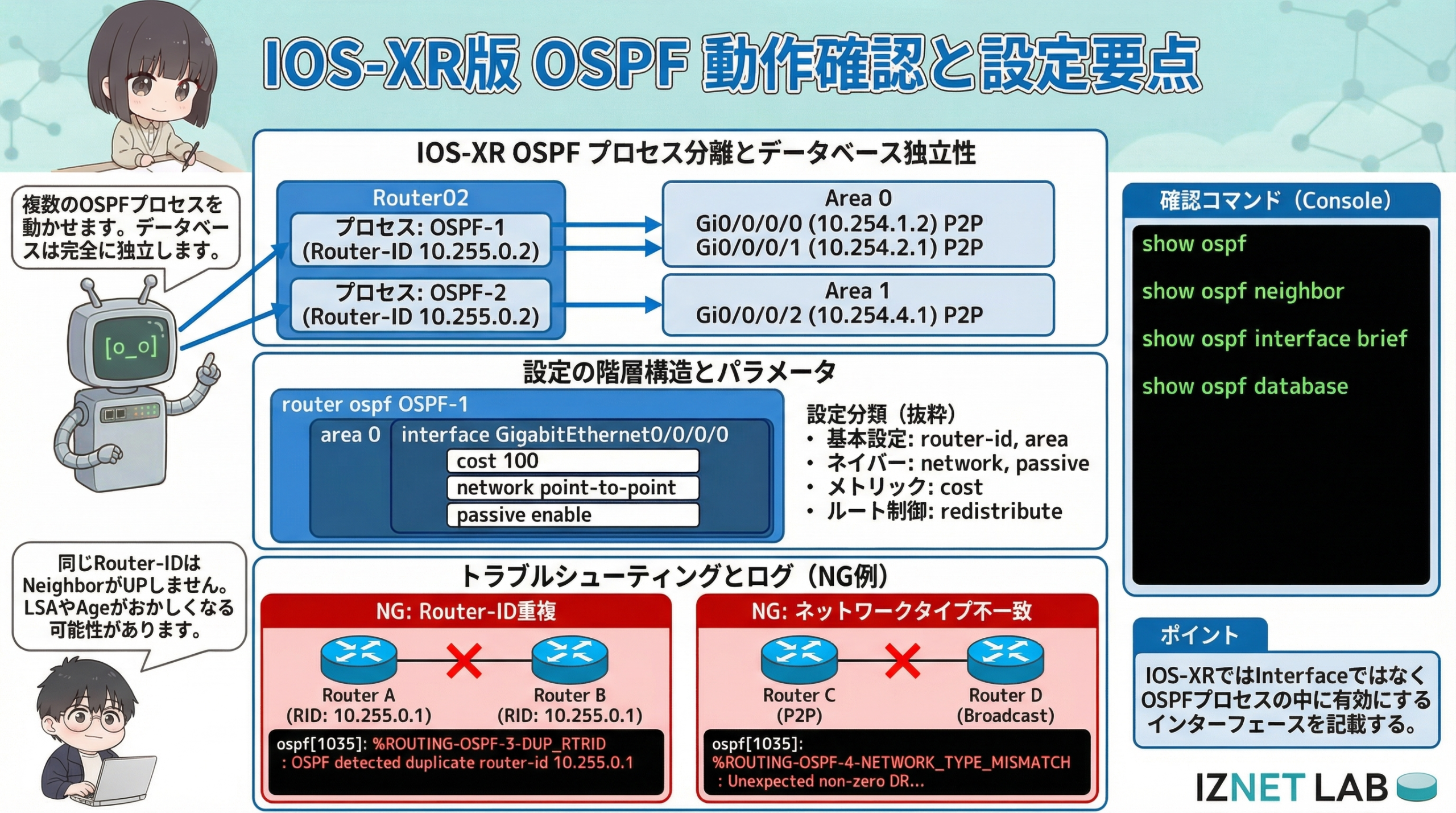
今回の検証で確認できたIOS-XR版OSPFの要点は、以下の3点です。
- 設定の階層構造 従来のIOSとは異なり、プロセス配下にエリアとインターフェースを定義する階層型の記述が必要です。
- プロセスの独立性 複数のOSPFプロセス(OSPF-1, OSPF-2など)を同時に起動でき、それぞれ完全に分離されたデータベースとして動作します。
- 不整合時の挙動 Router-ID重複やネットワークタイプの不一致(P2P vs Broadcast)はネイバー確立の致命傷となりますが、
DUP_RTRIDやMISMATCHといったログ出力で原因を特定可能です。
IOS-XR特有の設定作法に慣れ、適切なログ確認を行うことが安定運用の鍵となります。
おすすめ書籍

 ポチップ
ポチップ